Technology

GitOps vs Traditional DevOps: The Next Evolution of Application Deployment

GitOps vs Traditional DevOps: The Next Evolution of Application Deployment

For years, deploying software meant a pipeline that built your code and then pushed it to servers. It worked, until someone changed something by hand in production, the pipeline said “success” while the cluster said otherwise, and nobody could explain exactly what was running or why. GitOps flips the model: Git describes what should be running, and software inside the environment keeps reality matching it. It is not a replacement for DevOps, but it is changing how many teams deliver applications. Here is how the two compare, where GitOps genuinely helps, and where it doesn’t.

First, a clarification: GitOps isn’t “instead of” DevOps

The title sets up a contest, but the two are not really rivals. DevOps is a broad culture and set of practices that bring development and operations together across the whole software lifecycle. GitOps is a narrower, more specific practice. One analysis puts it simply: DevOps is a broad cultural framework uniting development and operations, while GitOps is a specific practice within it, using Git as the control plane for declarative infrastructure and deployment state, typically implemented with Argo CD or Flux on Kubernetes

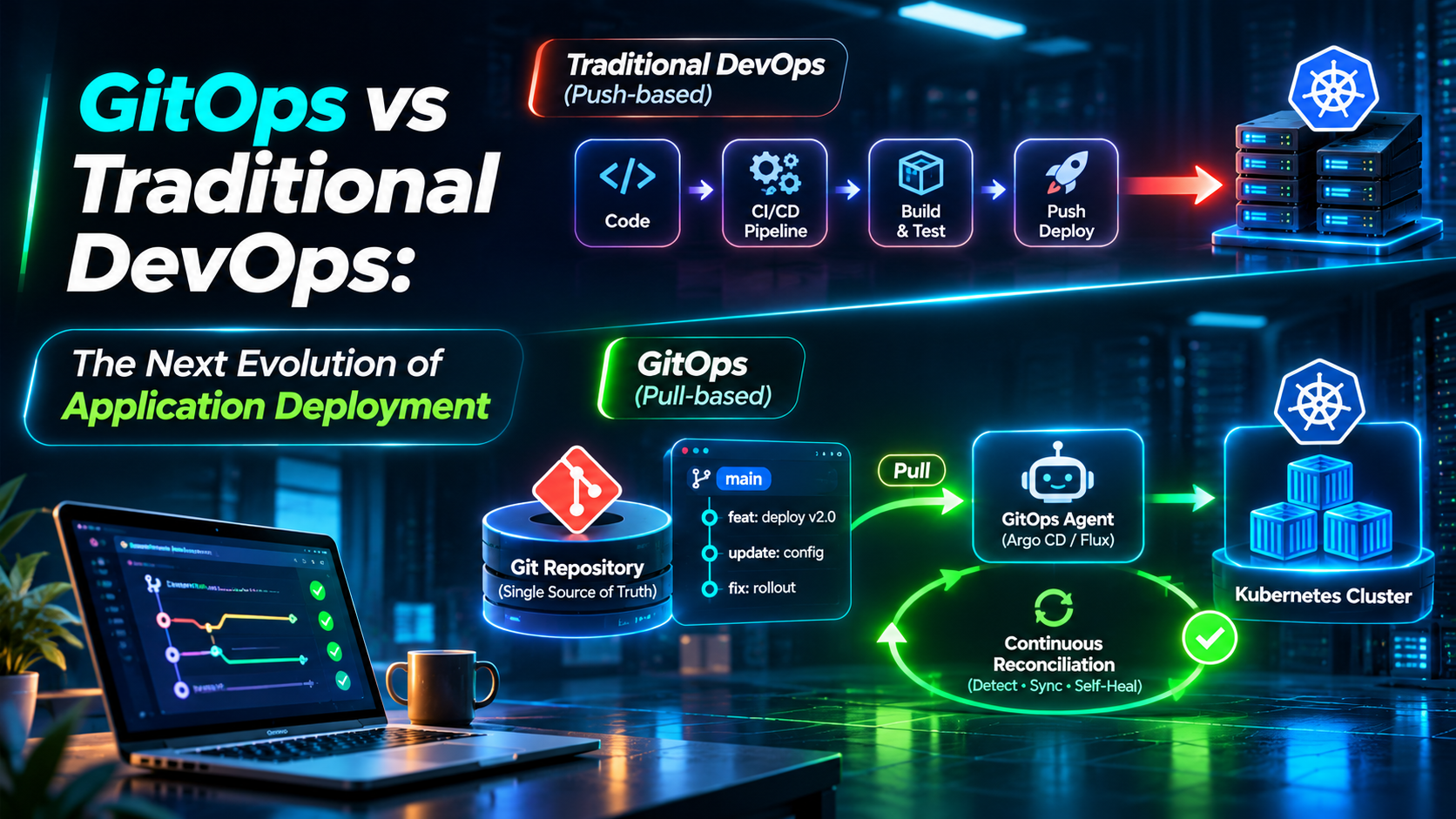
So the real comparison is between two ways of handling deployment: the traditional push-based CI/CD pipeline, and the pull-based GitOps model. That is the comparison this article makes.
How “traditional” DevOps deployment works

In a classic CI/CD setup, the pipeline does everything:

  1. A developer commits code.
  2. The pipeline builds it, runs tests and creates an artifact, such as a container image.
  3. The pipeline then pushes the change to the target environment, usually by running commands like kubectl apply or calling a cloud API with stored credentials.
  4. The pipeline reports success or failure, and then it’s done.

This works well and is the foundation of how most teams ship software today. But it has built-in weak spots:

  • The pipeline needs powerful credentials. To push into production, the CI system must hold keys to your cluster or cloud account. That makes the pipeline itself an attractive target
  • Nobody watches afterward. Once the push completes, nothing checks whether the live system stays as intended. As one comparison puts it, push deploys and forgets, while pull deploys and watches
  • Drift creeps in. An engineer tweaks a setting directly in production to fix an urgent problem. A resource gets edited manually. Over time, what is running no longer matches what is in your repository, and nobody knows exactly how.
  • The source of truth is blurry. Is it the repo, the pipeline config, the cluster, or someone’s laptop? During an incident, that question costs time.
  • Rollbacks can be awkward. Reverting often means re-running pipelines or reconstructing a previous state by hand.

How GitOps works

GitOps keeps the same goals, fast, repeatable, reviewable delivery, but changes who does the deploying and where the truth lives.

The idea is formalized by the OpenGitOps project, part of the CNCF, in four principles. In plain terms, the desired state is declarative, it is stored in a way that guarantees versioning and immutability with a full history, it is pulled automatically by software agents, and it is continuously reconciled with the actual state.

In practice, it looks like this:

  1. Everything is declared in Git. Your Kubernetes manifests, Helm charts or other configuration describe the desired state of the environment, usually in a separate configuration repository.
  2. Changes happen through pull requests. Want to deploy a new version or change a setting? Open a pull request, get it reviewed and merge it. That merge is the deployment decision.
  3. An agent inside the cluster pulls and applies. A GitOps operator, such as Argo CD or Flux, runs inside the cluster, continuously comparing live state to Git-declared state and correcting any drift automatically
  4. Reconciliation never stops. If someone changes something manually, the agent detects the difference and either reports it or puts it back.

A minimal Argo CD example looks like this: it simply tells the cluster to watch a folder in a Git repository and keep itself in sync.

apiVersion: argoproj.io/v1alpha1
kind: Application
metadata:
  name: my-app
  namespace: argocd
spec:
  project: default
  source:
    repoURL: https://git.example.com/org/config-repo.git
    targetRevision: main
    path: apps/my-app
  destination:
    server: https://kubernetes.default.svc
    namespace: my-app
  syncPolicy:
    automated:
      prune: true      # remove resources deleted from Git
      selfHeal: true   # undo manual changes (drift)

One important caveat from practitioners: not everything labelled GitOps is truly GitOps. One guide notes that a push model, where a CI pipeline calls kubectl apply, isn’t GitOps; it’s CI/CD with manifests in Git. Putting files in Git is not enough. The defining feature is the reconciling, pulling agent.

Side by side

DimensionTraditional push-based CI/CDGitOps (pull-based)
Who deploys The pipeline pushes changes inAn agent in the cluster pulls changes
Source of truthSpread across pipeline, scripts and environmentGit repository
Drift handlingUsually undetected until something breaksDetected and corrected continuously
CredentialsCI holds production accessCredentials stay inside the cluster boundary
RollbackRe-run pipeline or manual fixRevert a commit
Audit trailPipeline logs, often incompleteGit history of every change and approval
ScopeEntire software delivery lifecycleDeployment and infrastructure state
Typical fitAny platformStrongest on Kubernetes and declarative infrastructure

The scope row is worth noticing. One comparison describes the difference in scope as DevOps covering the entire software lifecycle, while GitOps covers deployment and infrastructure state.

Why teams are moving toward GitOps

  1. A single, auditable source of truth. Every change to production is a commit, with an author, a timestamp, a review and a reason. For regulated industries and for post-incident reviews, that history is gold.
  2. Self-healing environments. Because the agent keeps comparing reality to Git, accidental or unauthorized manual changes do not linger. The cluster is pulled back to the declared state.
  3. Simpler, safer rollbacks. To undo a bad deployment, you revert the commit, and the agent brings the cluster back. Recovery becomes a normal Git operation rather than an emergency procedure.
  4. Better security posture. In a pull model, the cluster credentials can stay inside the cluster instead of being handed to the pipeline. The CI system no longer needs broad deployment rights, which reduces what an attacker gains by compromising it
  5. Consistency across many environments. Declaring each environment in Git makes it easier to reproduce staging, production and new regions, and to manage many clusters from one place.
  6. Pull requests become the control layer. Changes go through the same review process as application code. One 2026 commentary describes the broader trend as teams describing in Git how an environment should look, reviewing proposed changes through a pull request, then letting controllers keep the live environment aligned with that approved state.

How widely is it used?

GitOps has moved well beyond early adopters, though the numbers come from different surveys, so treat them as a rough picture rather than precise measurements.

  • CNCF’s annual survey, published in January 2026, found that 58% of “cloud native innovators” use GitOps principles extensively, against 23% of “adopters.”
  • Among users of Argo CD, 42% manage more than 500 applications from a single instance, and a quarter connect more than 20 clusters, and 97% of surveyed Argo CD users run it in production.
  • On tooling, two projects dominate. Argo CD and Flux both implement the same pull-based reconciliation model; Argo CD is more widely adopted and has a richer UI, while Flux is lighter and more Kubernetes-native. One report puts Argo CD at around 60% of GitOps-managed clusters per CNCF’s 2025 survey, while another analysis shows a split closer to Argo CD 57% and Flux 31%. Methods differ, but Argo CD leads in both.

The honest downsides

GitOps is not a free upgrade. Teams that have run both models report real friction.

  • A mental model shift. In traditional CI/CD, a green pipeline means the deployment succeeded. In GitOps, a green pipeline only means the image has been built and the manifest change has been committed to Git; the deployment succeeds when Argo CD syncs, which happens asynchronously, typically within a few minutes. One team called this the most significant friction point, because engineers expected pipeline success to equal deployment success.
  • Pull requests must be a real gate. If reviews are rubber stamps, teams will route around GitOps with direct kubectl edits.
  • CI and CD can fall out of sync. The build produces a new image, but the manifest in Git still points to the old one. The common fix is automation: image update tools such as Argo CD Image Updater or Flux Image Automation open pull requests automatically when new images are available
  • Secrets are tricky. Storing plain secrets in Git is unsafe. Teams use encrypted approaches, such as SOPS-based decryption supported by Flux and Argo CD plugins, or external secret managers.
  • It’s Kubernetes-centric. Argo CD and Flux are built for Kubernetes, so teams without Kubernetes, or a clear path to it, may find less value.
  • Adoption is human work. One analysis argues that if GitOps stalls, the blocker probably isn’t Argo CD versus Flux, but getting application teams to trust a pull-request based deployment model and documenting the new workflow.
  • A new wrinkle: AI agents. One 2026 review flags AI agents that open pull requests as a fresh challenge, which makes review discipline and policy checks even more important.

Which should you choose?

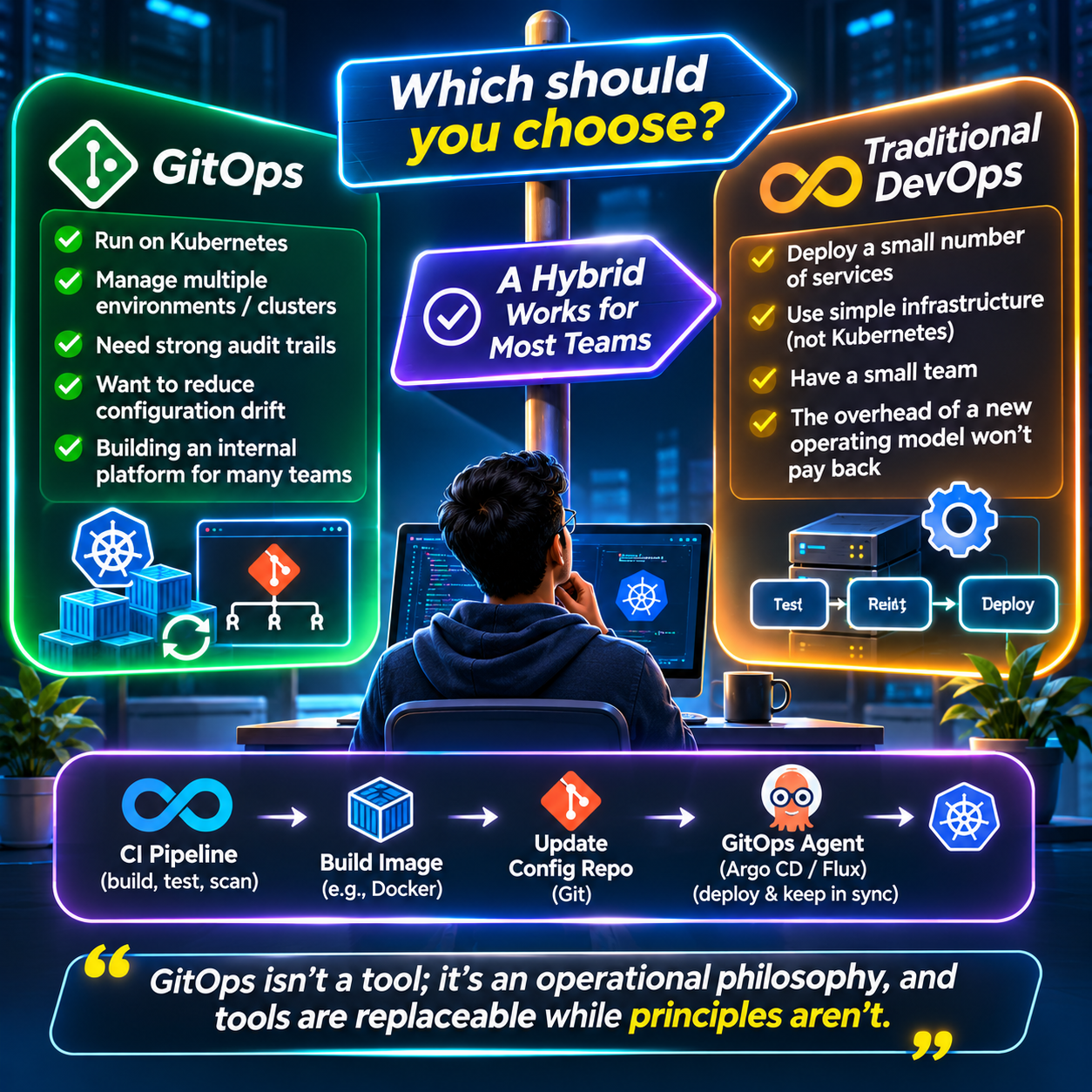
GitOps is a strong fit if you run Kubernetes, manage multiple environments or clusters, need strong audit trails, want to reduce configuration drift, or are building an internal platform for many teams.

Traditional pipelines may be enough if you deploy a small number of services to simple infrastructure, are not on Kubernetes, or your team is small and the overhead of a new operating model would not pay back.

A hybrid is common. Most teams keep their CI pipeline for building, testing and scanning, and add GitOps for the delivery step: CI produces the image and updates the config repository, and the GitOps agent handles the rest. In other words, GitOps tends to complement existing DevOps practice rather than discard it. As one practitioner summed it up, GitOps isn’t a tool; it’s an operational philosophy, and tools are replaceable while principles aren’t.

A simple adoption path

  1. Step 1: Start with a pilot

    Pick one non-critical application and one cluster. Decisions between Argo CD and Flux are best made after a pilot rather than from feature lists.

  2. Step 2: Separate application code from configuration

    Use a dedicated config repository so deployment changes have their own review trail.

  3. Step 3: Keep CI focused on build and test

    Have it publish images and update manifests, not touch the cluster directly.

  4. Step 4: Install the controller and turn on drift detection

    Start in “report only” mode if you want to see differences before enabling auto-correction.

  5. Step 5: Solve secrets early

    Choose an encrypted-in-Git or external-secrets approach before real credentials appear.

  6. Step 6: Make pull requests meaningful

    Require reviews, add automated policy checks, and restrict direct cluster edits.

  7. Step 7: Train the team

    Explain the asynchronous model, show how to read sync status, and document how rollbacks work.

Frequently Asked Questions

Is GitOps replacing DevOps?

No. DevOps is the broader culture and set of practices covering the whole software lifecycle, while GitOps is a specific way of handling deployment and infrastructure state within it. Most teams use GitOps alongside their existing CI pipelines.

What’s the main technical difference between GitOps and a normal CI/CD pipeline?

Direction and ownership. In a traditional pipeline, the CI system pushes changes into the environment and then stops. In GitOps, an agent inside the environment pulls the desired state from Git and continuously reconciles reality to match it, correcting drift automatically.

Do I need Kubernetes to use GitOps?

The most popular tools, Argo CD and Flux, are built for Kubernetes, and that is where GitOps works best. The principles, declarative state in version control and automated reconciliation, can apply elsewhere, but without Kubernetes or a path toward it the benefits are usually smaller.

Is Argo CD or Flux better?

Both are mature, graduated CNCF projects that follow the same pull-based model. Argo CD has a richer web interface and a larger share of installations, while Flux is lighter and more Kubernetes-native. The better choice depends on your team and is best settled with a small pilot.

Key takeaways

  • GitOps is a practice within DevOps, not a replacement for it; the real contrast is push-based pipelines versus pull-based reconciliation
  • The four OpenGitOps principles are declarative state, versioned and immutable storage, automatic pulling by agents, and continuous reconciliation
  • Benefits include a single auditable source of truth, automatic drift correction, easy rollbacks by reverting a commit, and credentials that stay inside the cluster
  • Argo CD and Flux dominate the tooling, with Argo CD leading on adoption in multiple surveys, though figures differ between sources
  • The main costs are a mental model shift to asynchronous deployments, the need for real pull request discipline, secrets handling and a Kubernetes-centric focus
  • Many teams keep CI for build and test and add GitOps for delivery, which is usually the most practical path