Technology

ERP for Colleges - How Integrated Campus Software is Quietly Reshaping Higher Education Administration

ERP for Colleges - How Integrated Campus Software is Quietly Reshaping Higher Education Administration

A practical, no-jargon guide to understanding how ERP systems work inside colleges and universities. From admissions chaos to seamless semester operations - this article walks through the real problems, real solutions, and what to look for when your institution is ready to go digital.

The Invisible Weight Every College Carries

There is a particular kind of exhaustion that college administrators know well but rarely talk about. It is not the exhaustion of difficult decisions or heavy workloads - it is the exhaustion of repetition. The same student record entered five times across five different systems. The same attendance data manually copied from paper registers into a spreadsheet that nobody trusts. The same fee dispute that drags on for weeks because the accounts office, the registrar, and the student portal all show different numbers.

If you have spent any meaningful time inside the operations of a college or university, you have seen this firsthand. A faculty member walks into the exam section asking why a student's internal marks are missing. The exam coordinator pulls up one Excel sheet. The department has a different version. The student's own portal shows something else entirely. Three sources of truth, and none of them agree.

This is not a technology problem in the way most people imagine it. Colleges are not short on software. Most institutions already have some attendance tool, some fee collection portal, some examination module they bought years ago. The real problem is that none of these systems talk to each other. They were never designed to. Each one was purchased or built independently, and they sit in their own corners, holding their own version of the truth.

Enterprise Resource Planning - ERP - was built to solve exactly this kind of fragmentation. Not by adding another tool to the pile, but by replacing the pile itself with a single, connected foundation.
What Does "ERP" Actually Mean in a College Context?

The term ERP - Enterprise Resource Planning - sounds corporate. It sounds like something from a manufacturing floor or a multinational supply chain. And historically, that is exactly where it came from. The first ERP systems in the 1990s were designed to help factories track inventory, manage procurement, and coordinate production schedules across multiple plants.

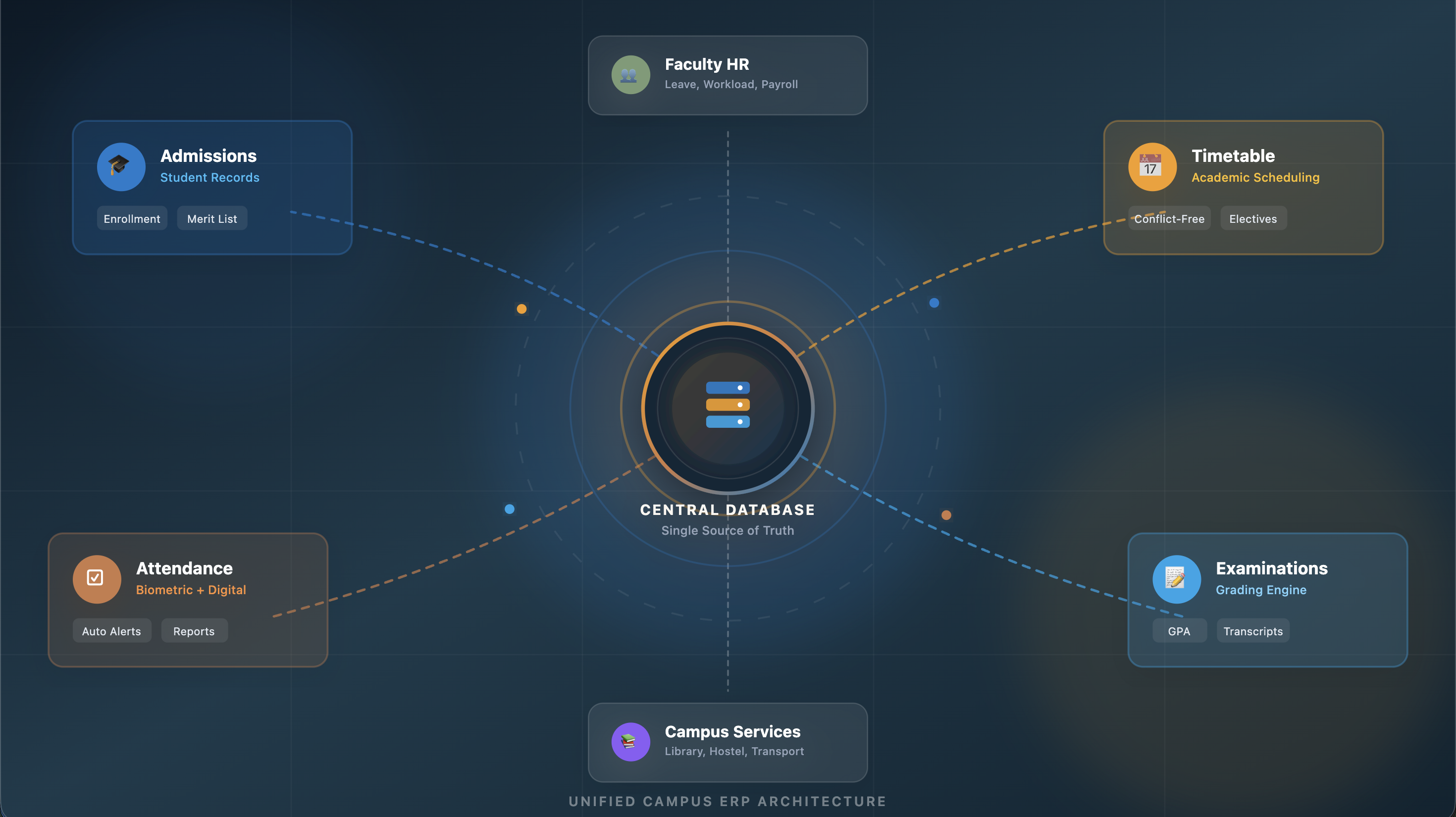
But the core idea behind ERP is not specific to any industry. It is a simple and powerful concept: instead of running ten different software tools that each store their own data in isolation, you run one integrated platform where every department works from the same shared database. When something changes in one place, every other place sees it instantly.

In a college, that translates to something very tangible. When a student pays their semester fee through the online portal, the finance office sees the payment immediately. The examination section knows the student is now eligible to sit for exams. The hostel administration can confirm the student's residential status. The student's own app reflects the updated balance. All of this happens in the same moment, from the same transaction, because all of these modules are reading from and writing to the same database.

There is no CSV export, no manual reconciliation, no phone call between departments to confirm what happened. The system already knows.

The Real Cost of Running Disconnected Systems

Most college administrators underestimate how much disconnected systems actually cost them - not just in software licenses, but in human hours, errors, and institutional reputation.

Consider a mid-sized college with around three thousand students. During the admission season, the enquiry desk collects candidate information on Google Forms. That data gets manually transferred into an offline admission register. Once a candidate confirms, the accounts team creates a separate entry in their billing software. The academic section enters the student into yet another system for roll number generation and section allocation. The library creates a borrower record. The hostel office opens a room allocation file.

That is the same student's name, phone number, parent details, and course information being typed out - by hand - at least five times. Multiply that by three thousand students, and you begin to see the scale of wasted effort. But wasted time is only the beginning. Every manual entry is an opportunity for error. A misspelled name here, a wrong phone number there, and suddenly the parent is not receiving attendance alerts because the SMS system has a different mobile number than the one on file.

These are not hypothetical problems. They happen every semester, in thousands of colleges, and they quietly erode the trust that students and parents place in an institution.

An ERP eliminates this entire category of failure. One entry. One record. Shared everywhere.

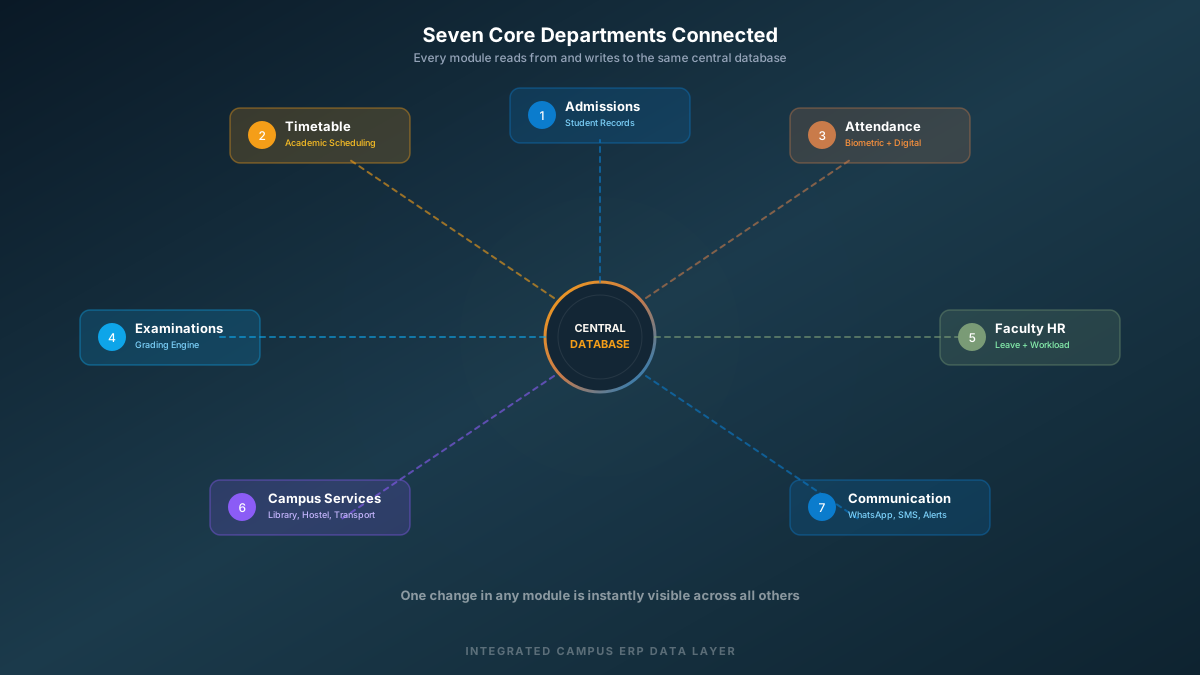
The Seven Core Departments an ERP Connects

A college is not a single operation - it is a network of interconnected departments that depend on each other far more than they usually realize. A well-designed campus ERP does not just digitize individual tasks. It weaves these departments into a single operational fabric. Here are the primary areas where integration makes the biggest practical difference.

  1. Admissions and Student Records - From the first enquiry to final enrollment, every candidate interaction lives in one timeline. Merit lists, document verification, offer letters, and seat confirmations all flow from the same data pipeline without any re-entry.
  2. Academic Scheduling and Timetables - Faculty allocation, room assignment, section and group management, elective mapping, and conflict-free scheduling operate from a single engine. When a lecture is rescheduled, every affected student and faculty member sees the change immediately.
  3. Attendance and Daily Operations - Whether attendance is captured through biometric devices, RFID cards, or faculty-marked digital registers, the data lands in one place. Shortage alerts, parent notifications, and compliance reports generate automatically.
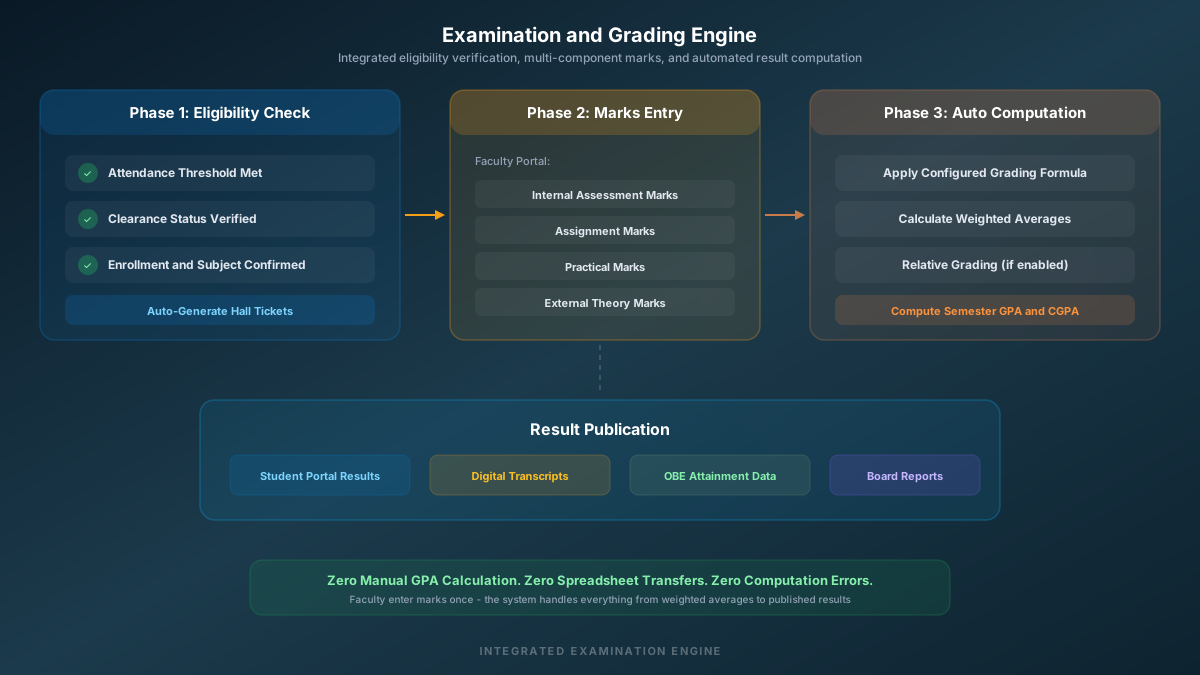
  4. Examinations and Grading - Internal assessments, practical marks, external theory scores, and calculated GPA all live in the same workflow. Faculty enter marks once, and the system handles weighted averages, relative grading, and result publication without manual computation.
  5. Human Resources and Faculty Management - Employee records, leave applications, multi-level approval workflows, department-wise reporting, and workload analysis operate from the same module. Faculty can view their own schedules, apply for leave, and track approvals from a single dashboard.
  6. Library, Hostel, and Transport - These campus services connect to the student master record. A library fine affects the student's clearance status. Hostel allocation connects to residential tracking. Transport route assignment syncs with daily attendance tracking.
  7. Communication and Parent Engagement - Automated alerts via WhatsApp, SMS, or push notifications keep parents informed about attendance, receipts, exam schedules, and institutional notices. The system sends these from real data, not from manually curated contact lists.

What a Typical Day Looks Like - With and Without ERP

The easiest way to understand the practical impact of an ERP is to walk through a single day inside a college that runs on one, and compare it to a college that does not.

At a college without an integrated system, the morning starts with paper attendance registers being passed around classrooms. A faculty member marks attendance, and those registers eventually make their way to the office - sometimes the same day, sometimes not. If a parent calls to ask whether their child attended class, the office staff has to physically find the register, locate the right page, and read out the marks. Reports on attendance percentage take days to compile because the data has to be extracted from dozens of paper registers and typed into spreadsheets.

Now picture the same morning at a college running on a modern ERP. The faculty opens their teaching portal on a tablet or phone, sees their scheduled lecture for this slot, and marks attendance digitally in under a minute. The moment they submit, the system calculates each student's cumulative attendance. Any student who drops below the threshold automatically triggers a parent notification via WhatsApp. The head of department can pull up a real-time attendance report for the entire department without asking anyone for anything.

That is not a futuristic scenario. That is what well-implemented ERP looks like in practice, and it works exactly this way in institutions that have already made the switch.

Where Aperp Fits - A Purpose-Built College ERP

While the principles of ERP apply broadly, colleges have very specific needs that generic business software simply cannot address. Academic grading formulas, semester-wise student progression, outcome-based education mapping, course outcome and program outcome matrices, multi-level leave approvals for faculty - these are deeply domain-specific workflows that a general-purpose ERP treats as afterthoughts, if it addresses them at all.

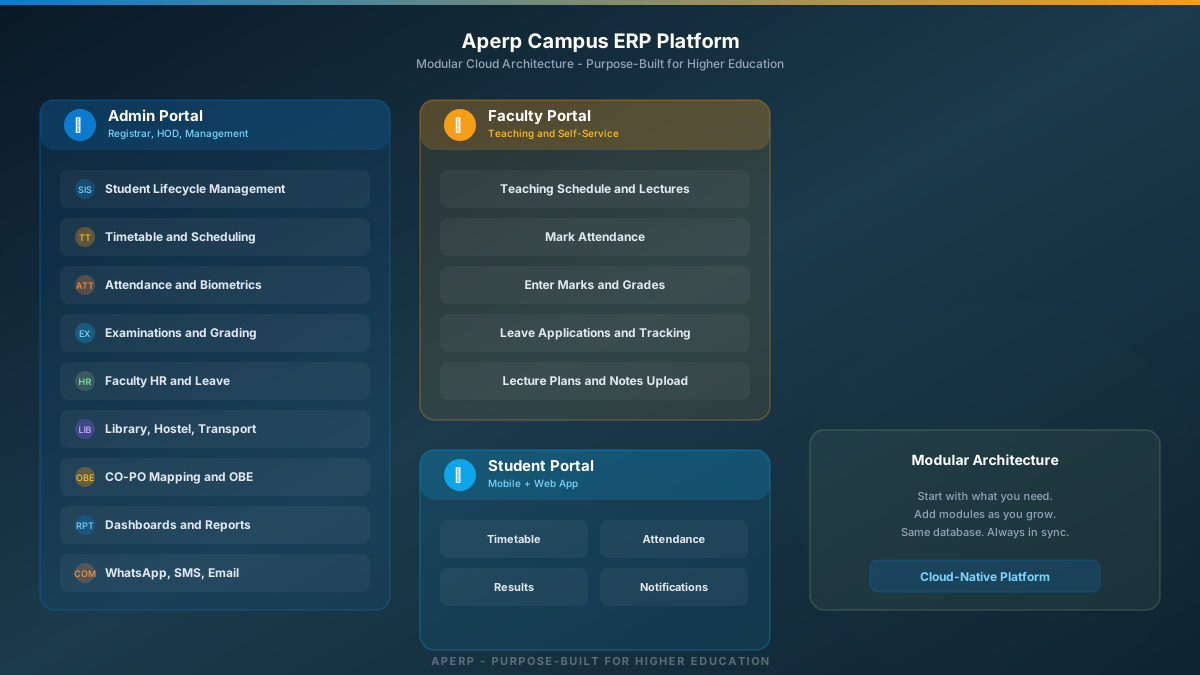
This is exactly the gap that Aperp was designed to fill. Built from the ground up for higher education institutions, Aperp is a modular cloud ERP that covers the complete academic and administrative lifecycle of a college campus. The platform handles student admissions and lifecycle management, academic scheduling with conflict-free timetable generation, biometric and digital attendance with automated parent alerts, examination management with configurable grading engines, faculty HR with leave workflows and workload tracking, library management with barcode and RFID integration, hostel room allocation and occupancy tracking, transport route management with student mapping, and real-time communication through WhatsApp Business API and SMS gateways.

What makes the platform particularly practical for institutions is its modular architecture. A college does not have to deploy every module on day one. You can start with the modules that solve your most urgent problems - say, student records and attendance - and progressively activate additional modules like examinations, library, or hostel management as the institution is ready. Every module reads from and writes to the same central database, so there is never a synchronization gap regardless of how many modules are active.

The platform provides dedicated portals for administrators, faculty, and students, each tailored to their specific responsibilities. Faculty access their teaching schedules, mark attendance, upload lecture plans, and manage leave through their own interface. Students view timetables, check attendance, access lecture notes, and receive notifications through a separate app. Administrators and department heads get real-time dashboards with campus-wide operational visibility.

The measure of a good campus ERP is not how many features it lists on a brochure. It is how many phone calls it eliminates between departments on a Monday morning.

— Aperp Engineering Team

How Attendance Actually Works Inside an ERP - A Real Workflow

To understand why integrated systems change everything, it helps to trace a single workflow from start to finish. Attendance is the perfect example because it touches faculty, students, parents, academic reporting, and examination eligibility - all from one daily action.

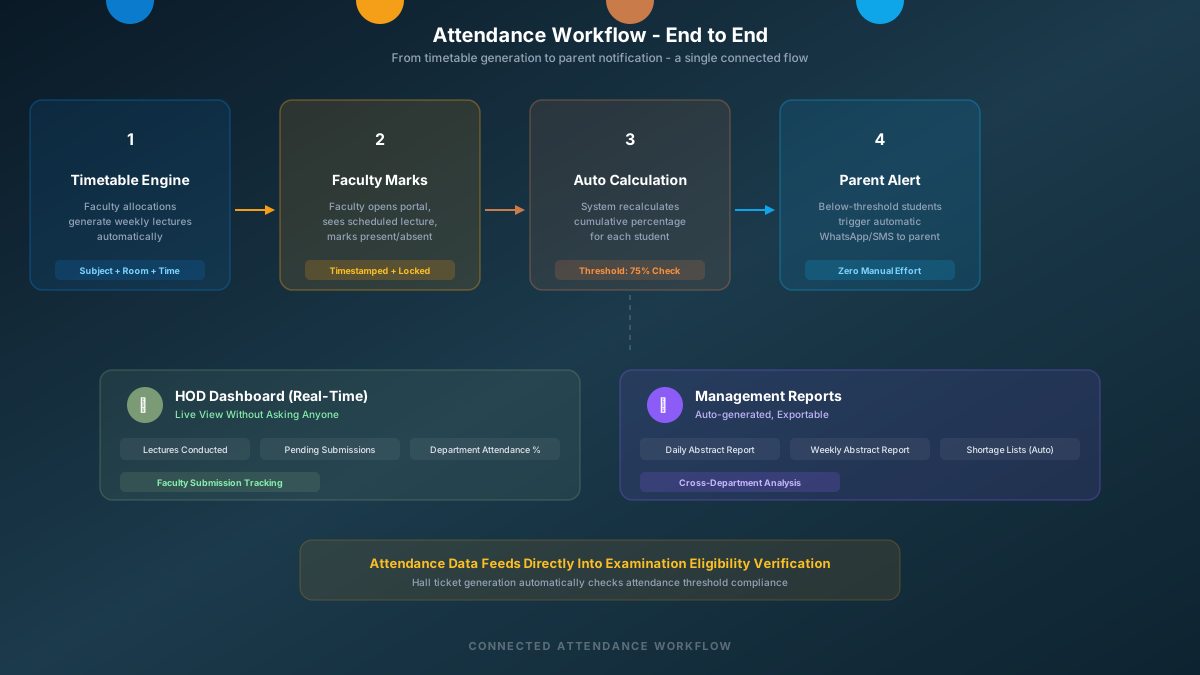
In a well-designed college ERP, the attendance workflow begins long before a faculty member walks into a classroom. The timetable module has already defined which faculty teaches which subject, in which room, for which section, at what time. These recurring allocations are generated into weekly lecture schedules automatically, accounting for holidays, cancelled classes, and faculty substitutions.

When the faculty member opens their portal at the scheduled lecture time, they see exactly which class they are expected to take. They mark each student as present or absent. The system timestamps the submission, logs which faculty marked it, and locks the entry against casual editing. If correction is needed, a separate request workflow handles it with proper authorization.

The moment attendance is submitted, the system recalculates each student's cumulative attendance percentage for that subject. If a student crosses below a configurable threshold - say, 75% - the system automatically sends an alert to the registered parent via WhatsApp or SMS. No human has to remember to check. No coordinator has to compile a shortage list.

At the department level, the head of department can see a live dashboard showing how many lectures were scheduled today, how many were actually conducted, and which faculty have pending submissions. At the institutional level, management can generate daily and weekly abstract reports that summarize attendance patterns across every department, every course, and every semester - in seconds, not days.

This is not a feature list. It is a connected workflow where every piece of data flows naturally from one step to the next, because every step lives in the same system.

Manual Processes vs. ERP-Driven Operations

Feature Without ERP (Manual / Disconnected Tools) With Integrated College ERP
Student Admission Data entered separately in enquiry register, accounts ledger, academic records, and library system Single entry at admission creates student record accessible across all departments instantly
Daily Attendance Paper registers collected end-of-day, manually compiled into spreadsheets weekly or monthly Digital marking by faculty in real-time, automated shortage alerts sent to parents within minutes
Examination Results Faculty submit marks on paper or email, exam cell manually calculates weighted averages and GPA Faculty enter marks in portal, system computes GPA, relative grading, and publishes results automatically
Faculty Leave Paper application routed physically between offices, approvals take days, no consolidated tracking Online application with multi-level approval workflow, automated leave balance tracking, and reporting
Parent Communication Phone calls from office staff using manually maintained contact lists, often outdated Automated WhatsApp and SMS alerts triggered by real events - attendance, notices - using verified data
Management Reporting Weeks of data collation from multiple departments to prepare a single board-level report Real-time dashboards showing campus-wide metrics, exportable reports generated in seconds

The Examination Engine - Where Integration Matters Most

If there is one area where disconnected systems cause the most damage in a college, it is examinations. The examination workflow depends on data from almost every other department. The exam section needs to verify that a student has met attendance requirements, has cleared all pending dues, is enrolled in the correct subjects, and belongs to the right semester and section. Without an ERP, the exam coordinator has to manually cross-verify each of these conditions with different offices - and with thousands of students, that process is both slow and error-prone.

In an integrated ERP, the system already has all of this information. When the exam section initiates hall ticket generation, the system automatically checks attendance eligibility, clearance status, and enrollment status in one pass. Students who meet all criteria get their hall tickets generated. Students who do not are flagged with the specific reason - whether it is an attendance shortage, a pending clearance, or an enrollment issue.

After exams, the grading engine takes over. Faculty enter component marks - internals, assignments, practicals, external theory - through their dedicated portal. The system applies the configured grading formula, calculates weighted averages, and if the institution uses relative grading, computes percentile distributions across the batch. Final results are published to the student portal, and digital transcripts become available for download. At no point does anyone manually calculate a GPA or transfer marks between spreadsheets.

This is the kind of workflow that simply cannot function well without integration. It is not about convenience - it is about accuracy, speed, and the institutional credibility that comes with error-free results.

What to Look for When Evaluating a College ERP

Not every software that calls itself a "college ERP" actually delivers integrated operations. The market is full of products that are essentially standalone modules packaged under a single brand name - they share a login screen but not a database. Before evaluating any platform, it helps to know what genuine integration looks like and what questions to ask.

  • Does a single student entry at admission automatically create records across attendance, examination, library, hostel, and transport modules - or does each department need to create its own entry?
  • When a faculty member marks attendance, does the system immediately update the student's cumulative percentage and trigger parent alerts - or does someone have to export data and calculate separately?
  • Can the examination module automatically verify attendance eligibility and clearance before generating hall tickets - or does the exam coordinator have to manually cross-check with other departments?
  • Does the leave management system allow multi-level approvals with automatic balance updates - or is leave tracked on separate spreadsheets alongside the main system?
  • Can the management dashboard show real-time campus-wide data - attendance rates, lecture completion, department-wise statistics - without anyone having to compile reports manually?
  • Is the platform modular enough that you can start with core modules and add others later without losing data continuity or requiring a fresh implementation?

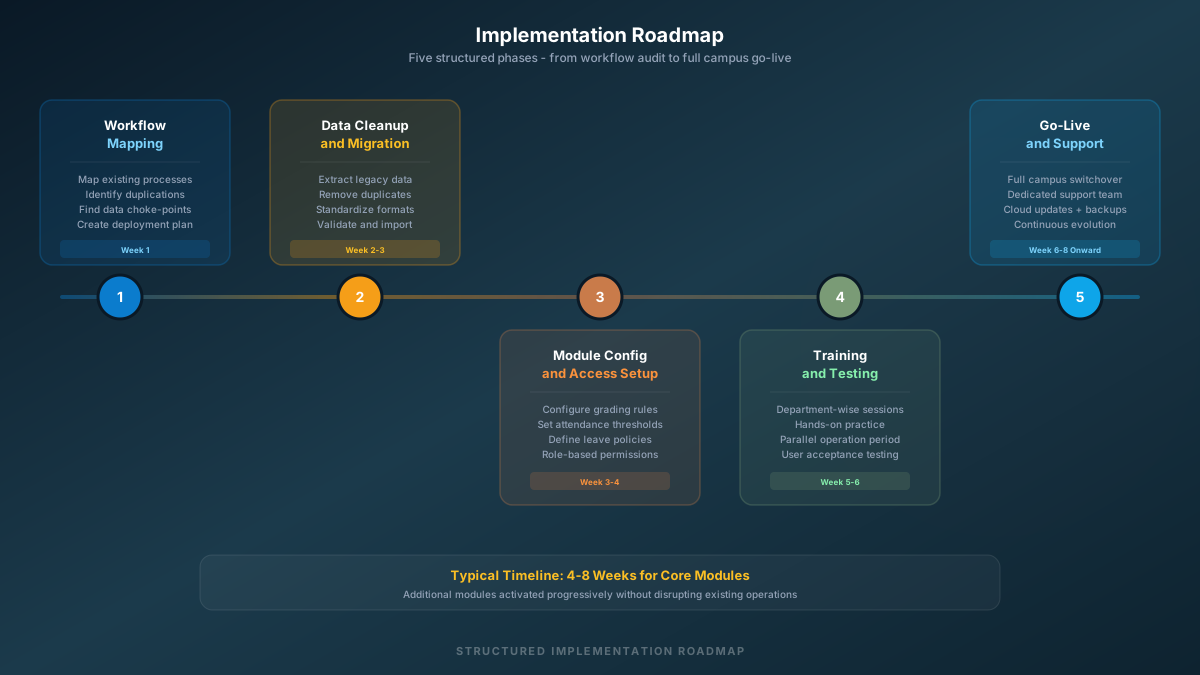
A Practical Implementation Roadmap for Colleges

  1. Step 1: Workflow Mapping and Gap Identification

    Before any software is configured, the implementation team maps the institution's existing processes across every department. Where are records being duplicated? Which workflows depend on manual coordination between offices? What data currently lives in spreadsheets that should be in a database? This audit creates the blueprint for the entire deployment.

  2. Step 2: Data Cleanup and Migration

    Historical student records, past examination data, faculty information, and accounting entries are extracted from legacy systems or spreadsheets. The data is cleaned - duplicates removed, formats standardized, missing fields identified - and migrated into the central database with full integrity validation.

  3. Step 3: Module Configuration and Access Setup

    Each module is configured to match the institution's specific rules - grading formulas, attendance thresholds, leave policies, academic calendar, department hierarchies. User roles and permissions are set up so that each person sees only the data relevant to their responsibilities.

  4. Step 4: Department-wise Training and Testing

    Faculty, office staff, and administrators go through hands-on training sessions tailored to their specific modules. The system runs in parallel with existing processes for a testing period, allowing users to build confidence before the full switchover.

  5. Step 5: Go-Live and Ongoing Support

    The institution transitions to the ERP as the primary operational system. Dedicated support handles initial queries and edge cases. Regular updates and feature additions are deployed through the cloud platform without disrupting daily operations.

Common Questions About College ERP Systems

How long does it take to implement an ERP in a college?

A well-planned implementation typically takes four to eight weeks for core modules like student records, attendance, and examinations. Additional modules like library, hostel, and transport can be activated progressively. The timeline depends on the volume of historical data that needs migration and the number of departments going live simultaneously.

Will our faculty and staff actually use it, or will they resist the change?

Resistance usually comes from poor training or systems that are genuinely harder to use than what they replace. A well-designed college ERP simplifies daily tasks - marking attendance becomes faster than paper, leave applications take seconds instead of days, and report generation that used to take hours happens in one click. When the system visibly reduces work rather than adding it, adoption follows naturally.

What happens if the internet goes down on campus?

Most modern cloud ERP platforms are designed with this reality in mind. Many operations can work with intermittent connectivity, syncing data when the connection returns. Additionally, campus networks with proper infrastructure rarely experience the kind of sustained outages that would disrupt operations. Biometric attendance devices, for instance, typically store data locally and sync when connected.

Can an ERP handle the complexity of outcome-based education and accreditation reporting?

This is actually one of the strongest arguments for an integrated system. Outcome-based education requires mapping course outcomes to program outcomes, tracking attainment across assessments, and generating CO-PO matrices. Doing this manually across spreadsheets is extraordinarily tedious. A purpose-built college ERP handles this mapping natively, with faculty entering marks through the normal examination workflow while the system simultaneously computes OBE attainment levels in the background.

Is our existing student data safe during migration?

Data migration is handled through a structured process - extraction, validation, deduplication, and secure import. No historical records are lost. The implementation team works with the institution's existing data in its current format and transforms it to fit the new system's schema. Backup copies of all original data are maintained throughout the process.

The Bigger Picture - Why This Matters Now

Higher education in India and across the world is going through a period of significant change. Accreditation bodies are raising their expectations around data-driven governance. Parents and students expect digital-first experiences from the institutions they choose. Regulatory frameworks like NEP 2020 are pushing for academic flexibility, credit-based systems, and outcome-based education - all of which require sophisticated data management that manual processes simply cannot deliver.

Colleges that continue to operate on fragmented, disconnected tools will find themselves spending more time managing data inconsistencies than actually improving education quality. The administrative burden will only grow as student numbers increase, regulatory requirements tighten, and stakeholder expectations rise.

An ERP is not a luxury for large universities. It is becoming a fundamental operational requirement for any institution that wants to run efficiently, maintain credibility, and offer the kind of organized, responsive experience that today's students and parents have come to expect. The institutions that recognize this early and invest in proper integration - rather than adding yet another disconnected tool - will be the ones that operate smoothly while others continue to struggle with the same Monday-morning chaos they have been dealing with for years.